A woman ties her hair back at the mouth of an alley, gets up and walks inward, crouches down to feed a cat, hangs laundry in the front yard, and finally sits on the front porch watching the street. Forty seconds, no plot, no music, the footage marked by the noise, soft focus, and occasional blown highlights of an old DV tape. A friend watched it and said it had a really nice feel to it.
The entire short was made in front of a computer. A few years ago, saying that would have sounded like an exaggeration. One person could edit or do VFX, but conjuring actors, streets, weather, and camera movements out of thin air—and tying them together on a timeline—usually took a whole crew. Now, someone sitting at a keyboard can make cinematic shots directly.
People at Keyboards Are Starting to Make Cinematic Shots
In online showcase demos for Seedance 2.5, a fifteen-second desert monster battle is split across six shots in a single generation. A fifteen-second skincare commercial is broken into eight cuts, with three characters taking turns interacting with the product before finishing on a close-up. A fifteen-second CGI product ad packs in ten cuts.
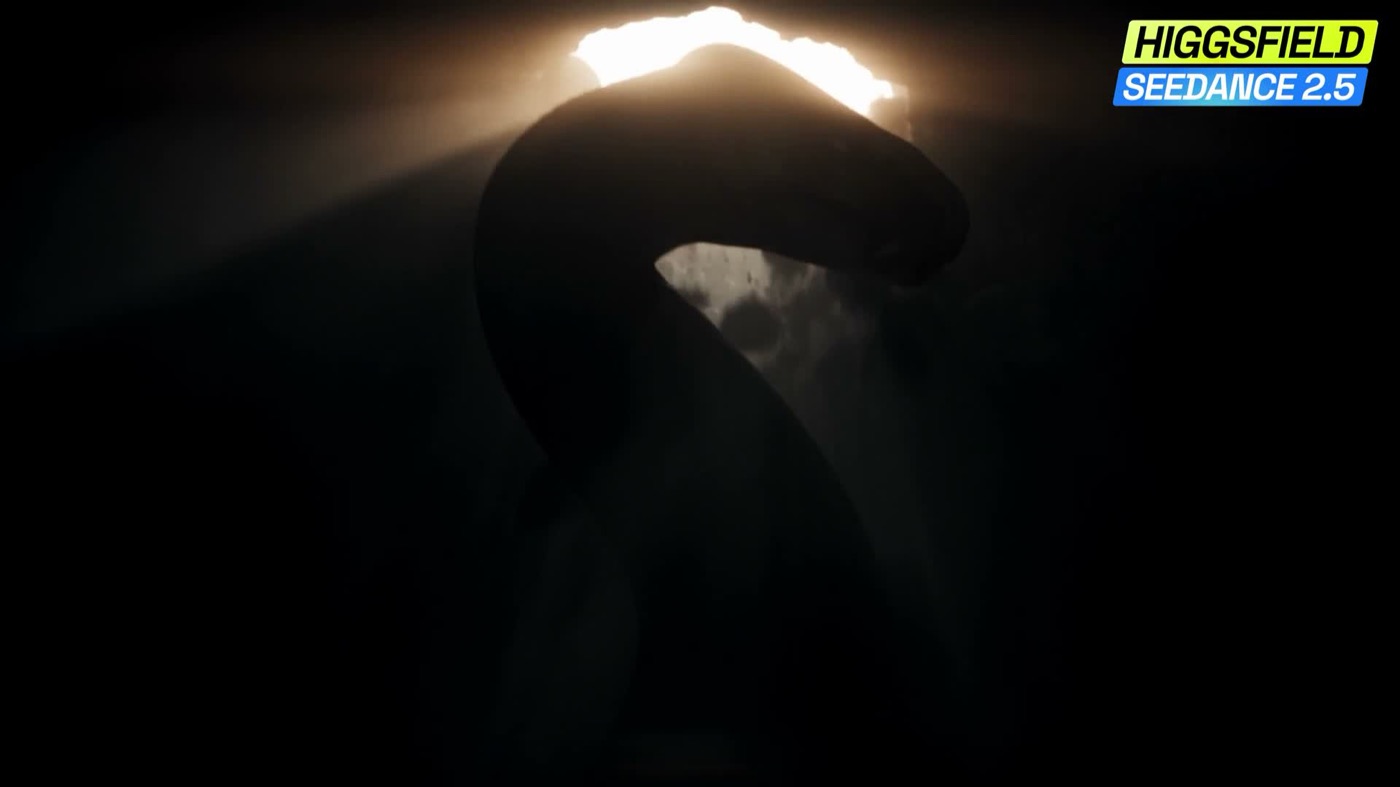
These are official demos released by the platform itself—not independent reviews, and certainly no guarantee that anyone clicking a button will get the same outcome. But compared to the early days of making a still image move, the model is clearly handling far more. Directing, cinematography, production design, acting, VFX, and editing used to be separate jobs; now they’re all crammed into the exact same generation task.
People are moving quickly on the commercial side too. Accounts producing AI reality shows—teachers and students playing hide-and-seek, sea survival challenges—are churning out an episode every five days on average and landing brand deals. By comparison, a public post-mortem of a real-life hide-and-seek shoot detailed about twenty camera operators, multiple editors, two to three weeks of shooting, and roughly three months for the full team to produce one episode.
Money Becomes One Generation at a Time
Efficiency went up, but the bills piled up just as fast. In the public tests back then, a single fifteen-second 4K video cost nearly 100 yuan—six times more expensive than 720p. Regenerate a shot ten times, and that’s 1,000 yuan. 10,000 yuan can buy a camera, or it can buy 100 clicks on the generate button. In the past, that choice was a no-brainer. But now that an ad shot often carries a 10,000-yuan budget anyway, people are starting to hesitate.
You save on actors, locations, and gear, only for the cost of rerunning prompts ten or twenty times to show up. If you want to burn fewer credits, you first have to make it crystal clear what you want.
My approach on this short shared similarities with those cases: keep the character consistent, lock down the location, maintain continuity of props, let shots unfold chronologically, and decide on the audio in advance.
First, Create a Face That Won’t Change
I started by using GPT Image 2 High to create a character master. The first version was too bland, so I scrapped it and started over, finally settling on a cropped gray tank top, light blue jeans, black canvas sneakers, a black cord necklace, and a windblown side ponytail.
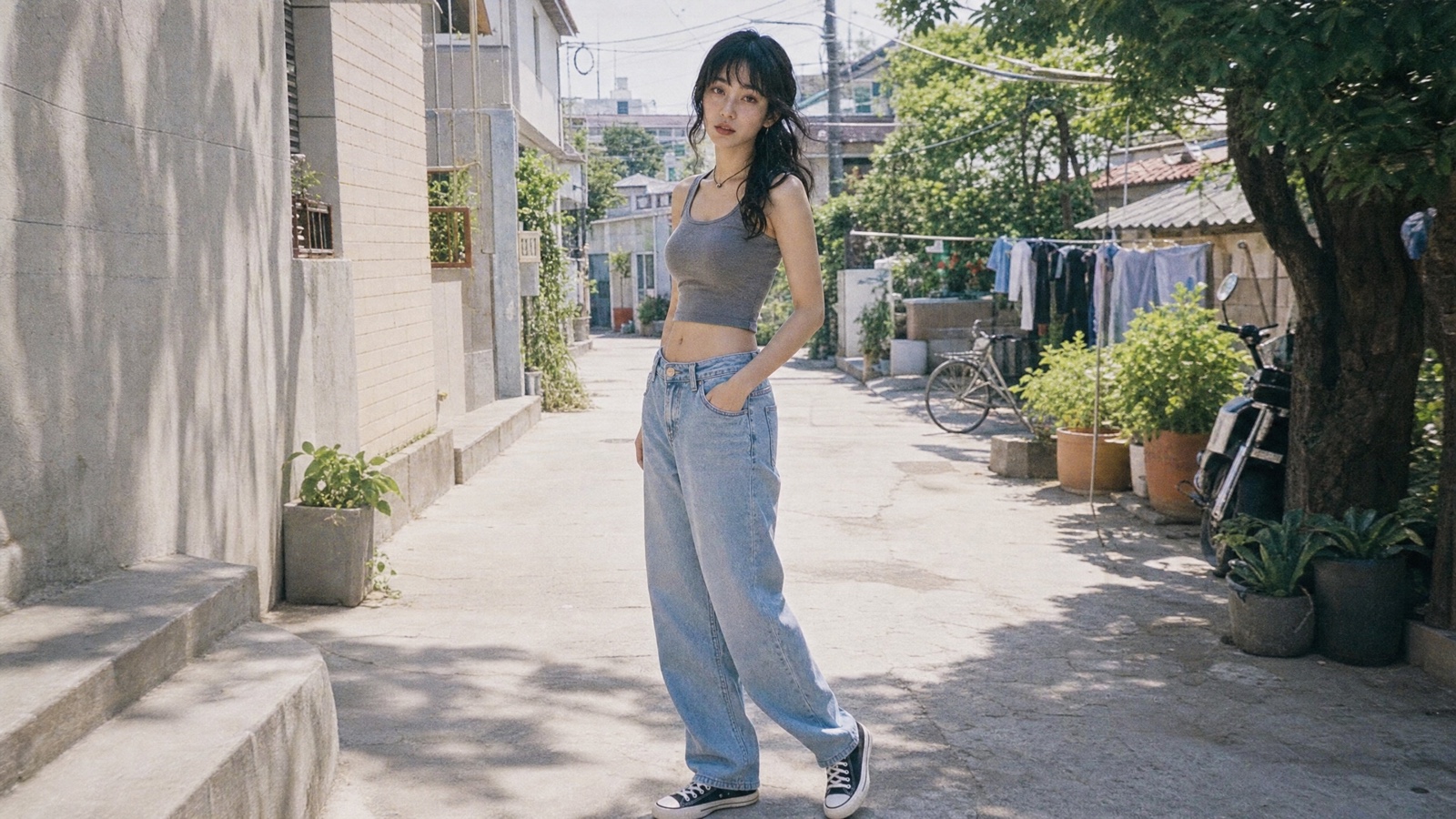
When storyboarding, this image was the sole character reference. Four shots: tying hair, feeding the cat, hanging laundry, and the front porch. The lead keeps moving toward screen right, while a white cup, wooden clothespins, light-colored clothes, and the cat appear sequentially across different segments. Whatever action one segment ended on, the next picked up from that exact posture.
The Prompt, Like a Production Document
The prompt was no longer just a single visual description—it was more like a miniaturized production document. First lay out the scene, then specify which reference assets to use and what must be locked down, choreograph actions and camera setups second by second, write out the audio separately, and finally add what must not appear.
Some commercial examples label the raw video as @video_1, then lock down the desktop, blue pen, powered-off monitor, screen light reflections, and handheld tracking trajectory item by item. The model is only permitted to add the creature and its cast lighting and shadows—no arbitrary color changes, speed ramping, or reframing. Audio is separately restricted: live sound only, no music.
Examples like these can be referenced directly, and I handled my own piece the exact same way: leave room for the model to improvise where it can, and write out everything that must not change item by item.
Next came the video stage.
4K or 1080p?
What AI calls 4K isn’t the same as 4K shot on a camera. When a camera increases resolution, it captures the real scene in finer detail; when a generative model enhances quality, it synthesizes eye reflections, hair strands, and material textures. These details look more realistic, but they didn’t necessarily exist in the original frame.
Right now, Seedance 2.0 supports 4K, while 2.5 doesn’t yet.
The Face Was Blocked by the Platform
I originally planned to feed both the character master and the opening storyboard frames into Seedance 2.0 so all four clips would carry the same face. But whenever you generate video containing a human face, Seedance requires identity verification first, meaning face assets cannot simply be uploaded directly. Even though this face was freshly generated by a model and this person doesn’t exist in reality, the system still treated it as a real individual’s face. Without verification, image-to-video was completely blocked. The final character look and four storyboard frames were finished, but right when I needed them most, I couldn’t use them.
That restriction annoyed me at the time, but looking back, you can’t simply blame the platform. Once anyone can generate cinematic shots, faces and voices turn into callable assets. The internet is already flooded with unauthorized voiceovers and deepfake swaps. Face licensing is no longer just a copyright issue to sort out after release—it has moved straight into the production pipeline.
In the end, I gave up on reference images and switched all four segments entirely to text-to-video. The trade-off was clear: the face would drift, and the wardrobe might change too.
Without Images, Relying on Text to Identify Her
With no images to reference, I had to make sure the text could identify her as closely as possible. All four prompts repeated the exact same character description under an internal codename, KDV-01: age, face shape, eyes, nose, skin tone, build, hairstyle, tank top, jeans, shoes, necklace—not a single detail missed.
KDV-01, Korean female around 25 years old, oval face, almond eyes, fair warm skin tone. Long wavy black hair, messy side-swept low ponytail. Faded gray sleeveless crop tank top, loose high-waisted light-blue jeans, black canvas sneakers, black cord necklace.
Describing the character wasn’t enough. I broke down the ten seconds and told the model what happened in each slice.
First 2.8 seconds: she sits on a concrete curb fixing her side ponytail; the camera just started rolling, focus hunting back and forth between her face and hand.
Next 2.7 seconds: she drops her hands, pauses, then stands up. The camera reframes half a beat late, exposure briefly brightening.
Remaining time: she walks screen right into a narrow alley. The camera follows slightly slow, ending on her continuing to walk rightward.
The timing wasn’t meant for the model to hit cues down to the second like an actor; I used it to check whether I had crammed too many actions into a single prompt, while giving each segment an ending that could link cleanly into the next.
Audio was written separately. Birdsong, wind, a distant scooter, faint neighborhood chatter, the rustle of clothes and leaves, shoes on concrete. No music, no voiceover, no post-production sound effects.
Then it handed me four clips, each 10.1 seconds long.
Between the Storyboard and the Final Cut, the Weather Changed
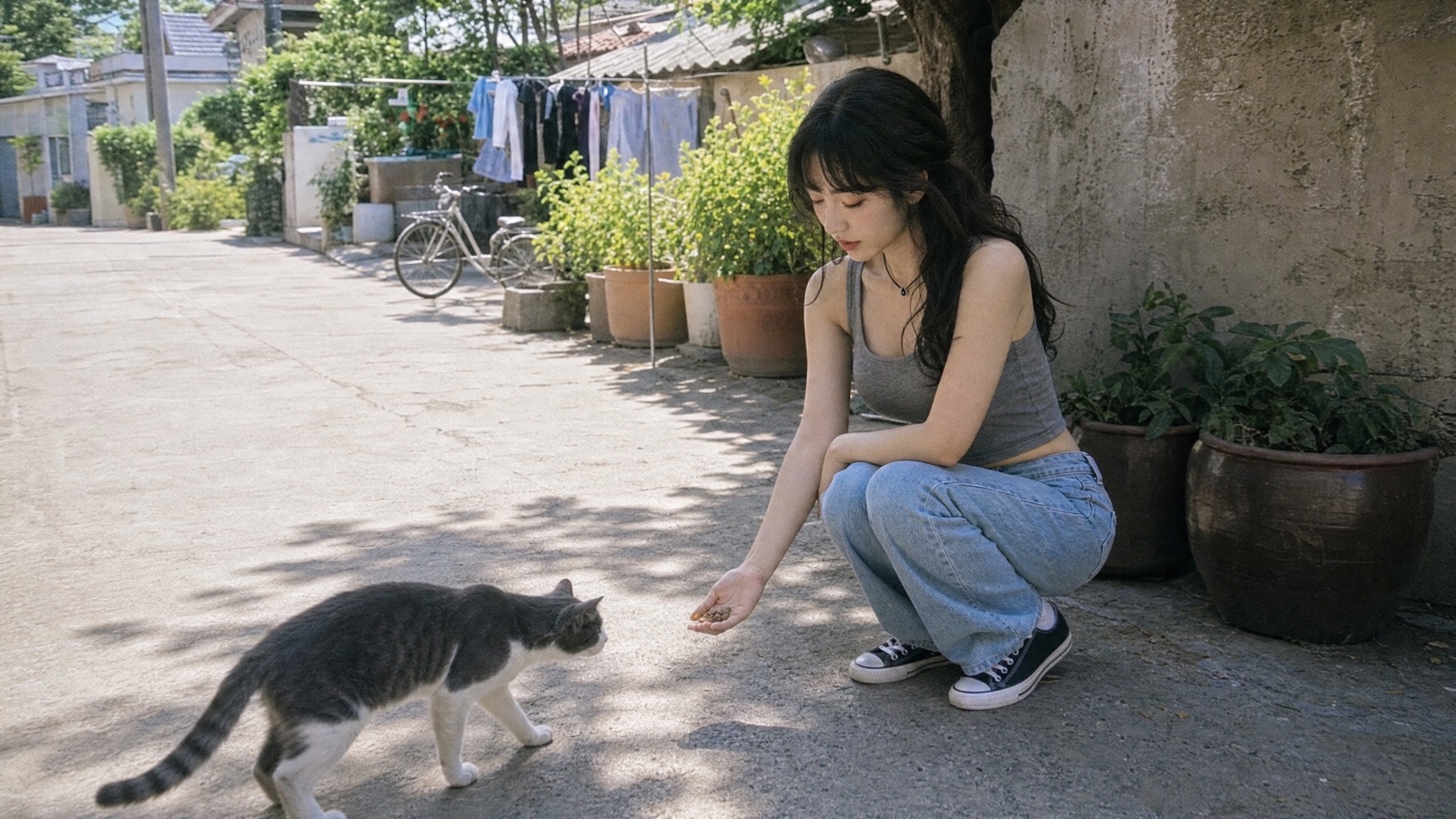
The two images below come from the same cat-feeding shot. The first is the storyboard I made: sunlight filtering through the leaves, the lead’s face clearly defined, the cat walking fully into the frame.
The final cut didn’t follow the plan. The weather turned overcast, the image skewed teal-gray, and only half of the cat entered the frame, smeared with motion blur. The woman’s face changed, the black cord necklace turned into a dark choker, and a brown leather belt materialized on her jeans out of thin air.
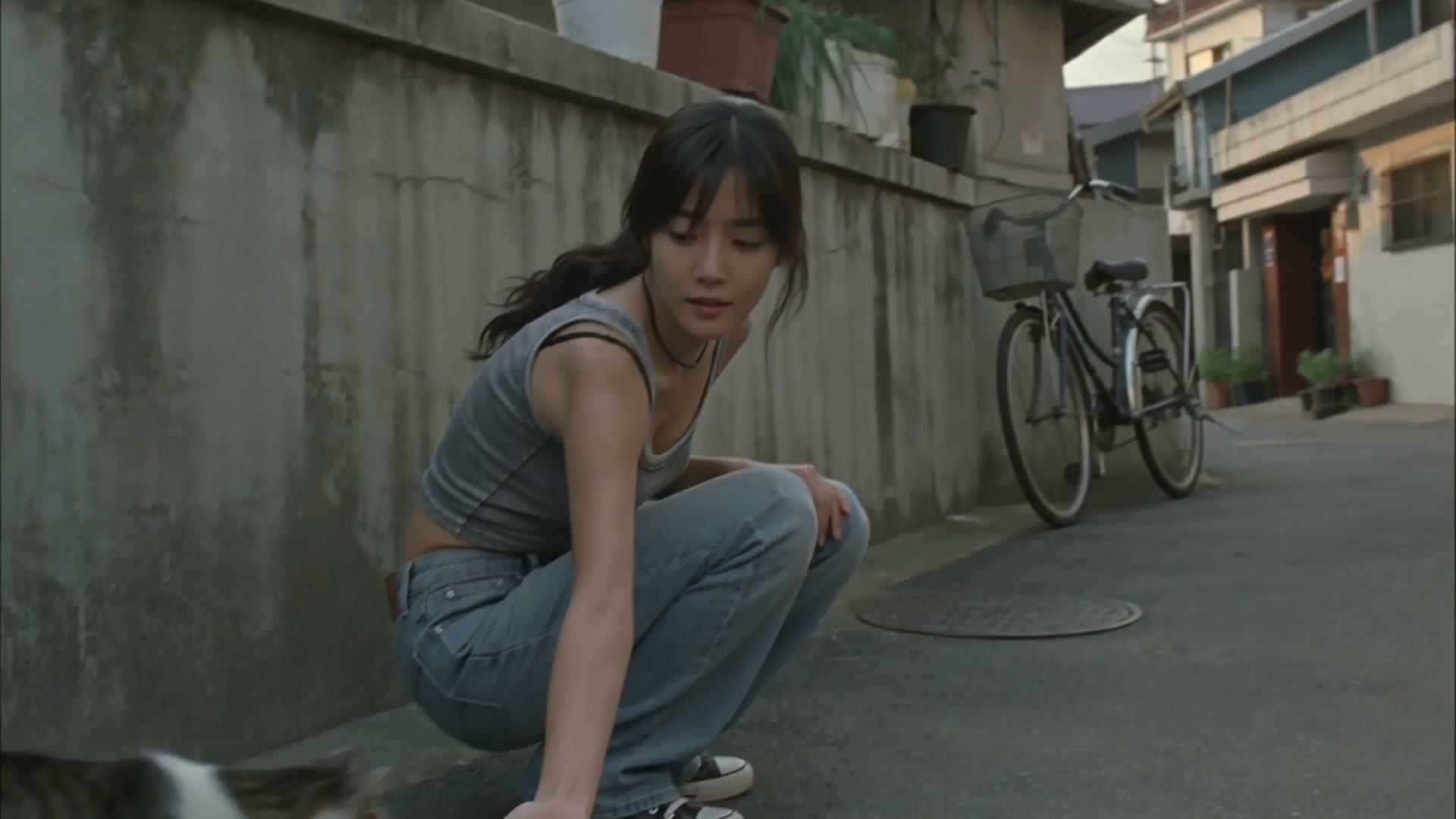
I looked back and forth between the two images a few times and kept the final cut. The storyboard looked gorgeous—lighting, subject, and cat were all in the right place, and because of that, it felt like a staged production still. The final cut’s overcast sky, the hands lagging half a beat behind, and the cat that never fully stepped into frame felt much closer to what I originally had in mind. When friends film everyday life, they don’t wait for the cat to strike a pose before pressing record.
Across the four clips, plenty still didn’t match up: the face wasn’t quite the same, there were slight wardrobe variations, and the weather jumped around. Fortunately, the character consistently moved to the right, and the props and actions carried over. Set against this kind of blurry, handheld footage with no clear narrative, none of it felt out of place.
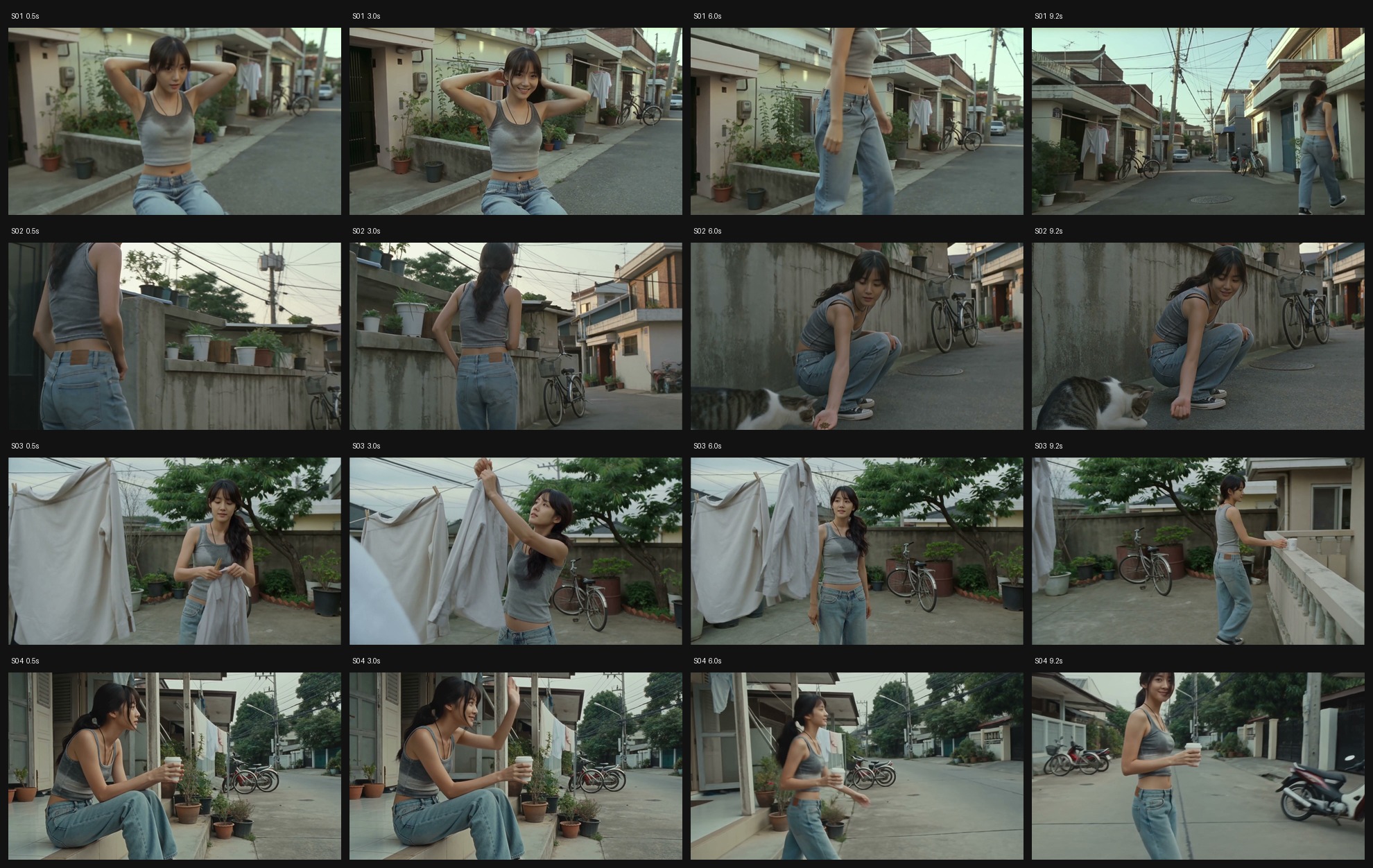
The four clips were generated separately and spliced together with help from AI at the end. No music, no LUTs, no noise reduction, and no added grain—just four frames of black at the very end.
Forty Seconds, Pieced Together
From that same batch, there were two even shorter clips, just eight seconds each. I generated them separately and they didn’t make the final cut, but I actually felt they were closer to the realism I was after. A wider aspect ratio, more noticeable handheld camera motion, like someone really pulled out a camera by the roadside and casually filmed a clip. Here they are to watch together.
The newly released Seedance 2.5 can now generate up to thirty seconds continuously, taking in up to fifty images, audio clips, and videos at once, with some demos even staging six camera cuts in a single run. Unfortunately, the showcase output is only 720p and 24fps. It looks fine on a phone, but on a large screen or in wide shots, there’s still a noticeable lack of detail, especially with frame stutter.
Relay Platforms Swap Models; Official Subscriptions Are More Reliable
There are plenty of platforms now, like Lovart, plus all kinds of relay sites. The catch behind that same button is that just because the UI lists a particular model doesn’t mean it’s actually generated by that model at that resolution. Some platforms swap models or throttle specs behind the scenes, leaving users with nothing more than a playable video. That’s why I insist on specifying the exact model, resolution, and a ban on silent downgrades right in my prompts, stick to official subscriptions whenever possible, and check the file metadata once it downloads. If you don’t do this, you’ll get burned without even knowing it.
Generating cinema from behind a keyboard has already arrived. Solo creators can take on monster films, commercials, and reality shows that once required massive teams—or, like me, craft a slice of cinematic footage.
Yet once you hit generate, creators still face plenty of choices: which version to burn cash on, what details count as authentic, which face you’re allowed to use, whether the model got swapped out, and whether to fix a botched shot or keep it.