
Claude Code account bans have been hitting hard lately, and plenty of primary accounts have been wiped out without warning. Many users have started spending ~$850 on an overseas Mac mini just to keep Claude Code running from one steady overseas machine—so no matter where you travel or switch Wi-Fi, you connect back to that same environment instead of bouncing proxy IPs or plugging into third-party wrappers.
For most individuals, spending that much on dedicated hardware plus colocation is overkill. Renting an overseas cloud VPS and splitting it among three people brings the two-year server cost down to roughly ~$55 per person.
The architecture is simple: install and run official Claude Code inside the overseas VPS, and use free VS Code on your own laptop as a remote control. When you finish a task, double-click a desktop shortcut to pull your files onto your local drive so they still open offline. Here is the overview:
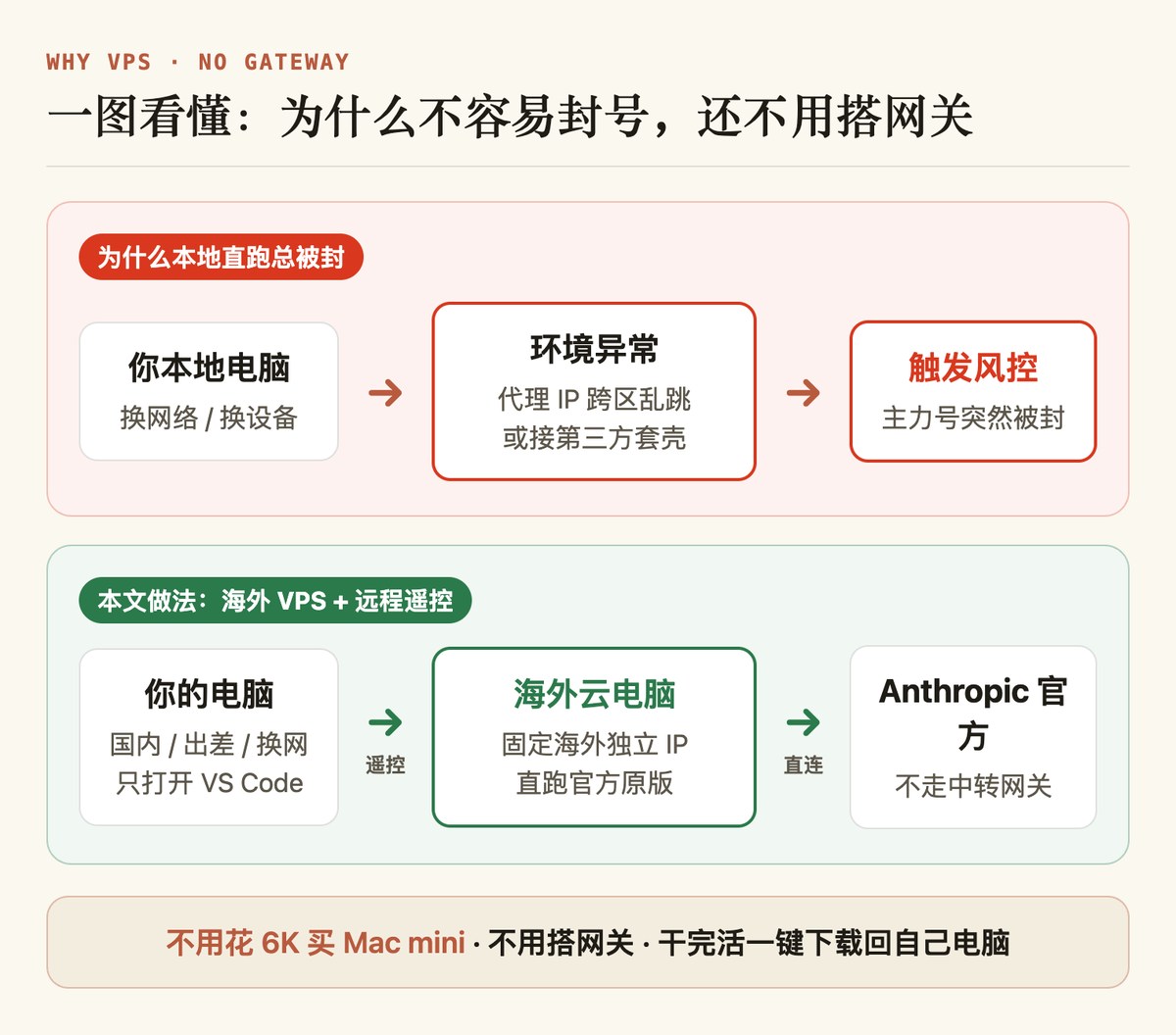
Pricing and Ban-Avoidance Boundaries
Verified pricing on November 19, 2026: Hostinger is running its Black Friday promotion. For three people sharing one box comfortably, KVM 2 (2 vCPU / 8 GB RAM / 100 GB NVMe) lists at $210.96 for 24 months on standard Black Friday pricing; opening from the link below applies an extra 20% first-order discount on top, bringing checkout total to $168.77 (before taxes—around 1,126 RMB, or roughly ~$56 / ~375 RMB per person for two years).
Direct entry: Open Hostinger Official Site (new first-time orders through this link currently receive an extra 20% off at checkout).
| Plan | Specs | 24-Month Black Friday + 20% Off | Renewal Rate |
|---|---|---|---|
| KVM 1 | 1 vCPU / 4 GB / 50 GB | $5.19/mo ($124.56) | $11.99/mo |
| KVM 2 (Recommended) | 2 vCPU / 8 GB / 100 GB | $7.03/mo ($168.77 total) | $14.99/mo |
| KVM 4 | 4 vCPU / 16 GB / 200 GB | $10.39/mo ($249.36) | $28.99/mo |
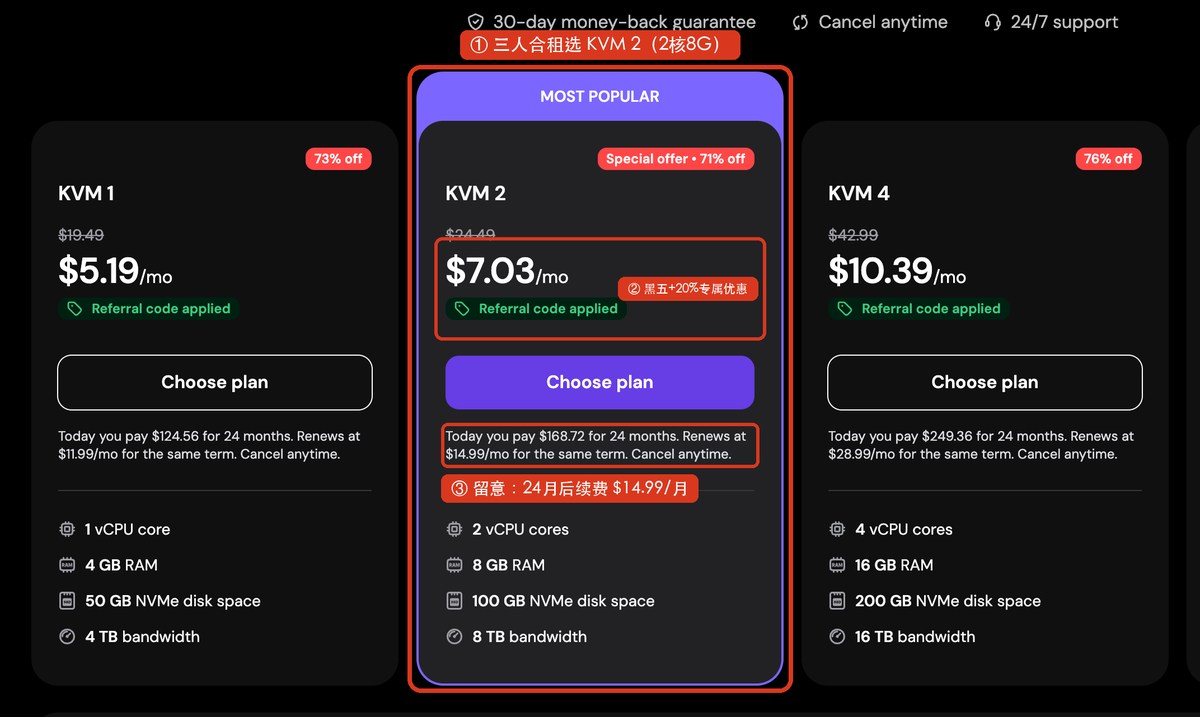
Anthropic lists 4 GB RAM as the minimum for Claude Code, so KVM 1 tightens fast when three people connect together—go straight for KVM 2. Check auto-renewal settings before month 24, and note each member still pays for their own Claude subscription or API usage separately.
Moving execution to an overseas VPS reduces cross-region IP jumps and third-party wrapper exposure, provided you stick to three non-negotiable rules:
- Share only the VPS, never a Claude account: each person pays for their own Pro ($20/mo), Max ($100/mo), or personal Anthropic Console API Key.
- Run only the official Claude Code client: never feed subscription credentials into third-party wrappers or reverse proxies.
- Keep the server dedicated: all three users share one data-center IP; noisy scraping or abusive scripts from one user affect everyone on the box, and Anthropic's regional and payment compliance checks still apply.
Step 1: Provision the VPS and Split Three Locked Accounts
Only the group organizer runs this step once.
1. Purchase and Boot the Server
- Open Open Hostinger Official Site, navigate to Services → VPS Hosting, and click Choose plan under KVM 2.
- Set Period to
24 months, leave the$6/moDaily auto-backup unchecked (free weekly backups plus local sync cover you), and select a low-latency Server location in an Anthropic-supported country (US, UK, Germany, France, Indonesia, or Malaysia; note region changes later wipe data).
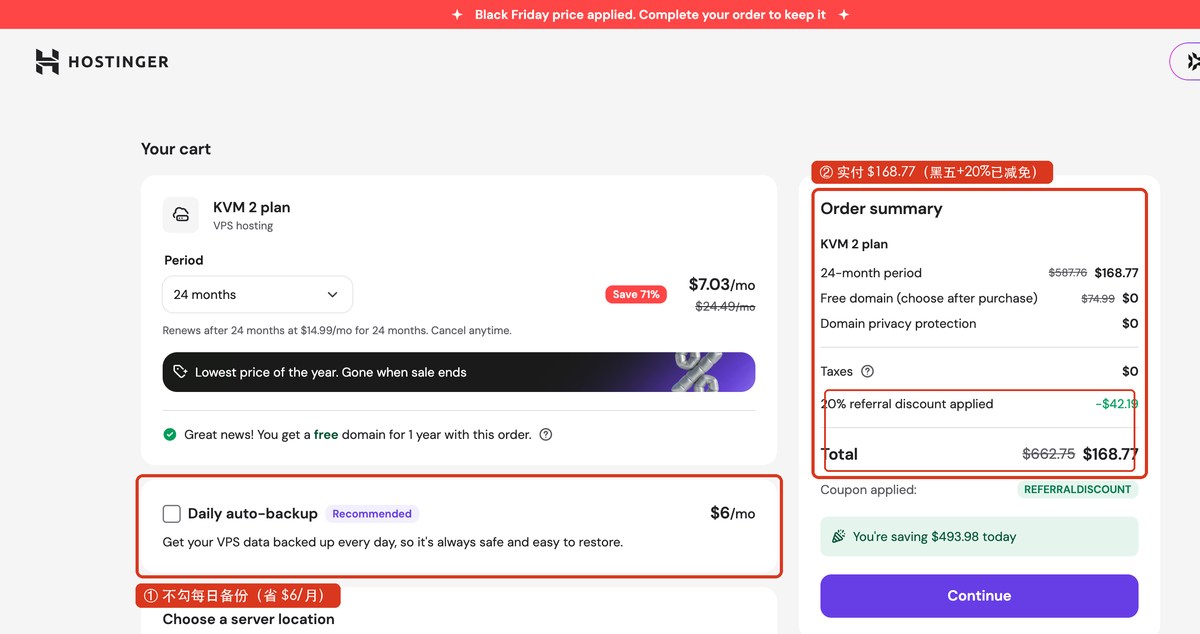
- Under OS template, select
Claude Code (Build on Ubuntu 24.04)and click Confirm (if skipped during checkout, the post-purchase onboarding wizard lets you pick it there).
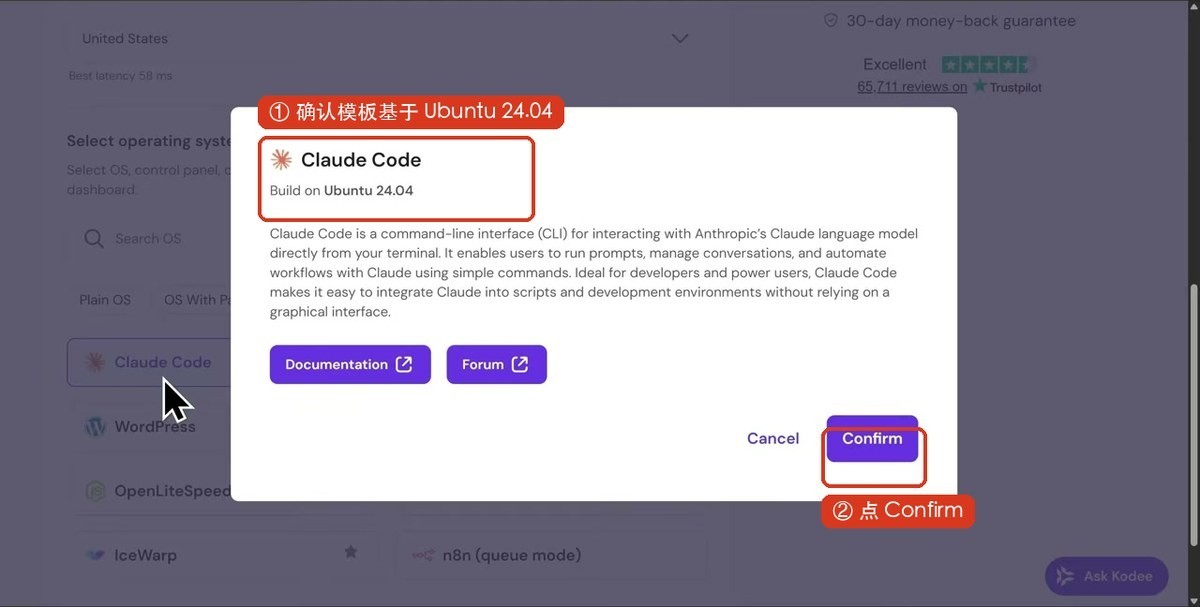
- Verify the total (around
$168.77; do not type another coupon code or it will overwrite the extra 20% off) and complete payment. - Click Get started, generate and save a strong root password, wait ~3 minutes for Running status, and copy your public IPv4 address.
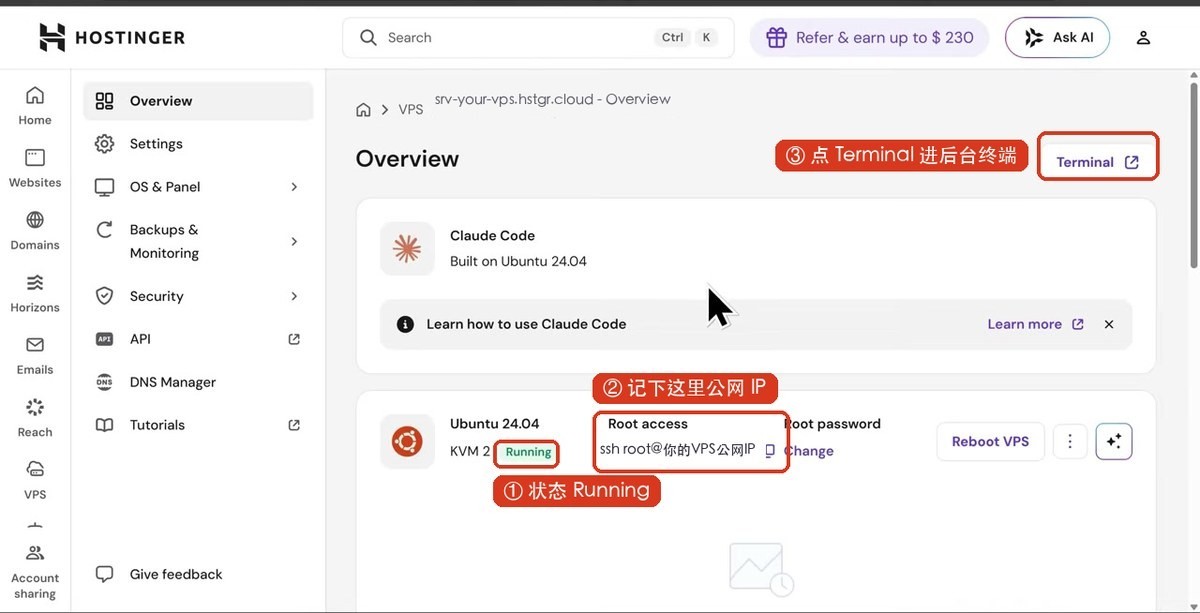
2. Ask AI to Isolate Three User Accounts
Never share the root login among three people. Isolate each person in a locked home directory with separate project files and Claude credentials:
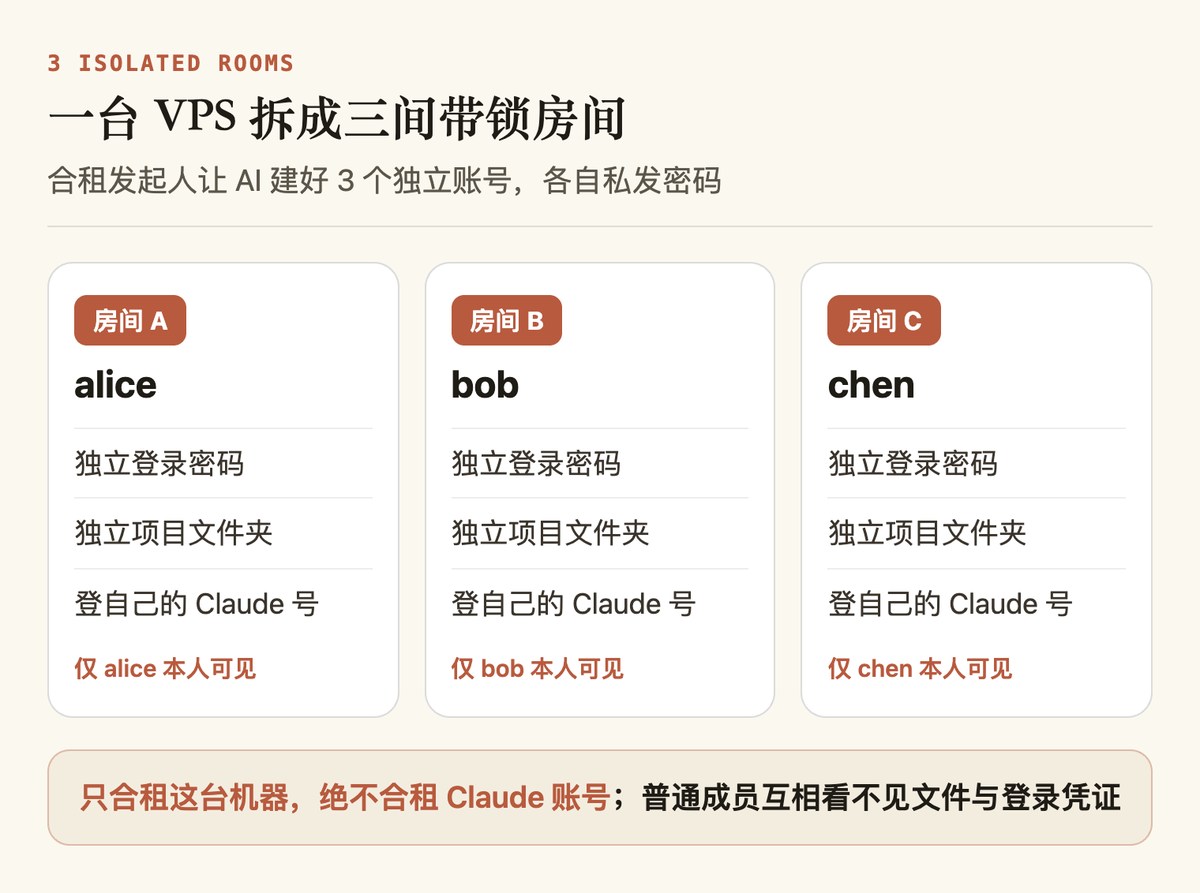
Open Hostinger's web Terminal, paste this prompt into your AI assistant (or Hostinger's Ask AI), swap the three usernames for your group, and run the generated commands step by step:
I just provisioned a Hostinger Ubuntu 24.04 VPS and I am inside the root terminal. Give me safe copy-paste commands to:
1. Install tmux, curl, and git;
2. Create a 4 GB swap file and persist it on boot so three concurrent sessions do not run out of memory;
3. Create three non-sudo users named alice, bob, and chen (without root privileges);
4. Lock all three home directories to permission 700 (owner-only access) and provide one verification command.
Do not change SSH port 22 and do not enable firewall rules that could lock out SSH. Explain each command briefly.
Double-check two details right after:
- Linux password prompts hide keystrokes intentionally—choose strong passwords (never
123456), press Enter twice, and confirm permissions on all three home folders are locked. - Send each partner only the public IP plus their own username and temporary password. Once all three finish setting up SSH keys below, ask AI to disable SSH password logins entirely for tighter security.
Step 2: Connect from Your Laptop via VS Code Remote
From this step onward, each of the three members sets up their own laptop.
1. Let Your Local AI Agent Configure Passwordless SSH
SSH key commands differ subtly between Windows and macOS. Send this prompt to a local AI coding agent (Cursor, Codex, Claude Code, etc.) or ask any AI chat for your OS-specific command, replacing the placeholder IP first:
Help me set up passwordless SSH login from this laptop to an Ubuntu VPS with username alice and public IP YOUR_VPS_PUBLIC_IP (replace before running).
1. Detect automatically whether this machine is Windows or macOS;
2. Check for an existing ed25519 SSH key pair and generate one if missing;
3. Install the public key into the server's ~/.ssh/authorized_keys (prompt me when temporary password or host-key confirmation is needed);
4. Test ssh alice@YOUR_VPS_PUBLIC_IP so login succeeds without asking for a password.
2. Connect VS Code in Three Clicks
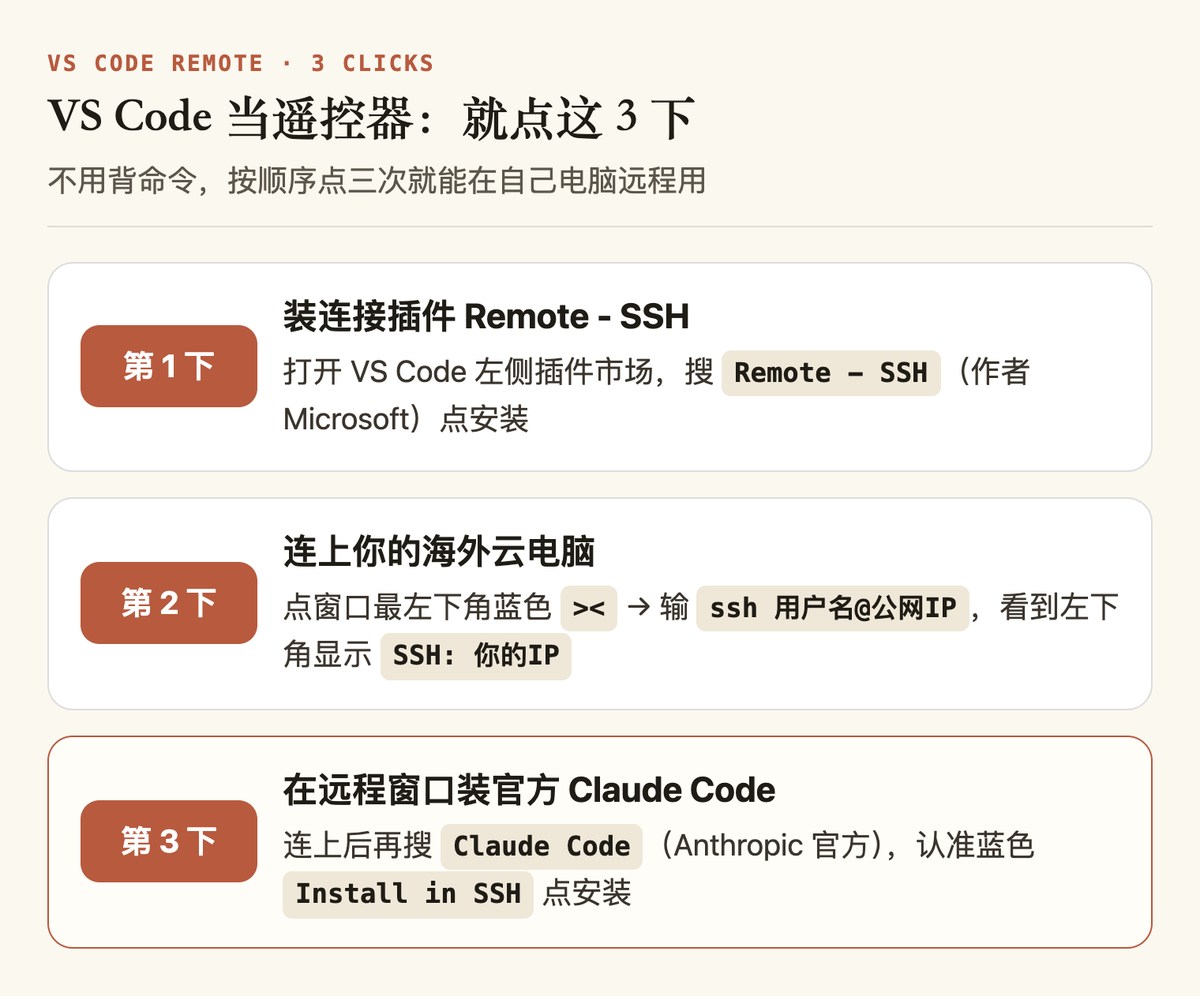
- Install free Visual Studio Code locally and install Microsoft's
Remote - SSHextension. - Click the blue
><icon at bottom-left → Connect to Host → Add New SSH Host, enterssh yourname@YOUR_VPS_PUBLIC_IP, save, then connect from the same menu until the bottom-left pill readsSSH: YOUR_VPS_PUBLIC_IP. - Inside that connected SSH window, search Extensions for
Claude Code(by Anthropic) and clickInstall in SSH. - Open Terminal → New Terminal in VS Code and run three quick commands:
- Create a project workspace:
mkdir -p ~/projects/demo-site && cd ~/projects/demo-site - Verify installation:
claude --version(if not found, install via the official script:curl -fsSL https://claude.ai/install.sh | bash && export PATH="$HOME/.local/bin:$PATH") - Launch and sign in:
claude(for subscription accounts, copy the printed URL into your local browser once, click Authorize, and paste the code back—after this initial handshake, runtime requests go straight from the overseas VPS to Anthropic; for API keys, pick Console auth. If the auth URL rejects, remove accidental line breaks in a plain text editor first.)
- Create a project workspace:
3. Run Your First Prompt
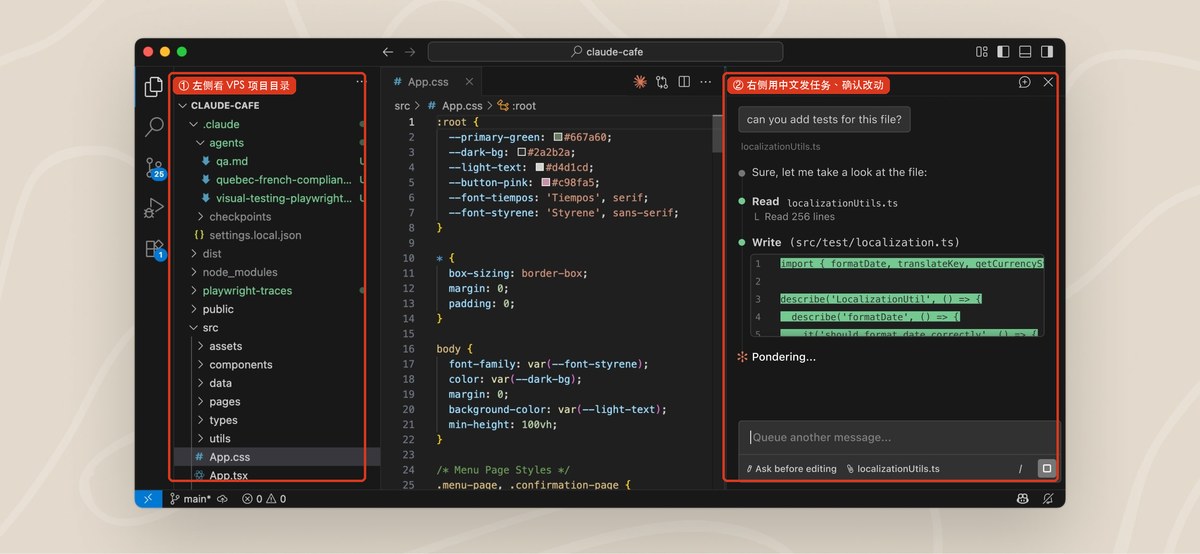
- In VS Code, click File → Open Folder and open
/home/yourname/projects/demo-site. - Click the Claude spark icon
✻to open the chat sidebar and run a starter test:
Build a single-file web app trip-checklist.html in this folder for an international travel packing checklist supporting checkboxes, category filters, custom item creation, and localStorage persistence, plus a concise README.md.
- Click Accept / Allow when prompted; the new files appear right in your Explorer pane.
Step 3: Sync Project Files Back Locally in One Click
Remember: files shown in VS Code live only on the VPS until synced down—turn off Wi-Fi and they vanish until reconnected.
Using free rclone over your existing SSH key keeps the server completely clean with zero extra daemon running on the VPS:
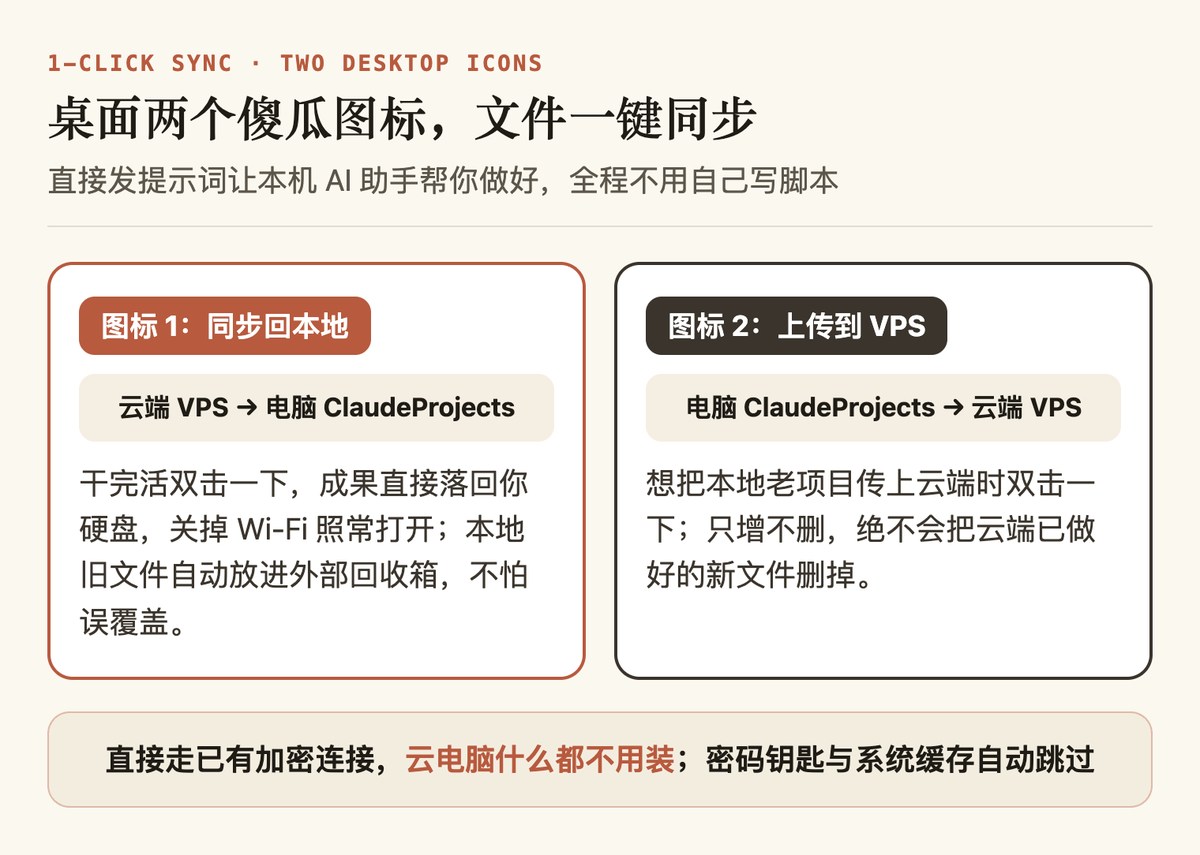
Let your local AI agent install rclone and build two click-to-run desktop shortcuts automatically:
Install and configure rclone on this computer (detect Windows or macOS) using SFTP key auth to my VPS (IP: YOUR_VPS_PUBLIC_IP, username: alice, key: ~/.ssh/id_ed25519), then create two clickable desktop shortcuts (.bat on Windows UTF-8, executable .command on macOS):
1. Pull from VPS: run rclone sync from /home/alice/projects to local ~/ClaudeProjects, moving overwritten or deleted local copies into a sibling folder ~/ClaudeProjects_Backup/timestamp outside the sync root.
2. Push to VPS: run rclone copy (add/update only, never delete server files) from ~/ClaudeProjects to /home/alice/projects, backing up replaced server versions into /home/alice/projects_backup/timestamp.
Exclude .env, .env.*, *.key, *.pem, .claude/**, .ssh/**, node_modules/**, .venv/**, __pycache__/**, .DS_Store, and Thumbs.db, pause at finish so I can inspect logs, and verify connectivity by listing the remote projects folder.
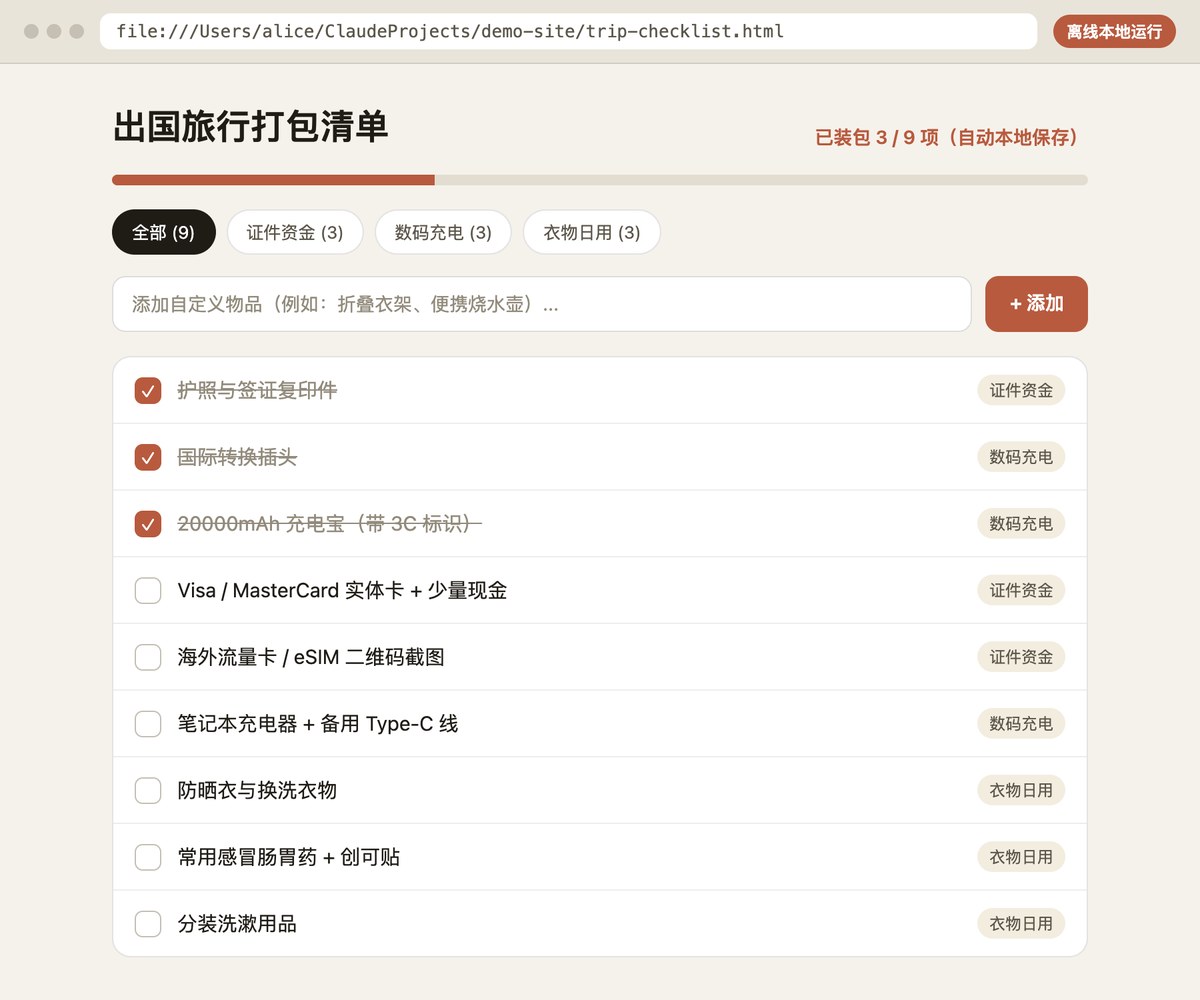
Offline verification test:
- Double-click the desktop Pull shortcut until completion.
- Close VS Code and turn off laptop Wi-Fi.
- Open local
ClaudeProjects/demo-site/and double-clicktrip-checklist.html—everything loads, checks off, and saves offline.
Daily Routine and 4 Honest FAQs
Every morning after initial setup takes three clicks:
- Open VS Code and reopen recent
demo-site [SSH: ...]; - Resume yesterday's thread or start a new prompt;
- Double-click your desktop Pull icon when wrapping up (or Push if you dropped an existing local project into
ClaudeProjects).
Four common practical questions answered plainly:
- If I close my laptop, reboot, or switch Wi-Fi, do I lose in-progress work?
Saved files and chat history live on the VPS, so reconnecting picks right up. Long multi-minute tasks inside the UI panel can pause if your laptop sleeps too long—before closing the lid on a heavy run, ask your AI how to open a detachable background session on the server so it keeps running cleanly. - How do privacy and billing work when three people split one box?
Locked directory permissions block other users from browsing your folders or Claude logins. Still, keep two realities clear: first, whoever holds Hostinger admin / root control technically has system-wide visibility, so split only with people you trust and never park personal secrets there; second, server costs are shared while Claude subscriptions and API bills stay 100% separate. - Does this guarantee zero bans forever?
Honestly, nothing can guarantee 100% ban immunity; Anthropic still enforces regional availability, billing checks, and usage terms. - What if a setup command throws an English error I don't recognize?
Paste the exact error message or screenshot straight into your AI assistant, mention you are configuring Hostinger Ubuntu + VS Code Remote SSH, and let it walk you through the fix.